Why your all‑electric home needs a registered cabler
Designing or upgrading a home today means planning for a future where your car, hot water, cooking and comfort are all electric – and where connectivity is just as important as power points. That future only works if the wiring and networking are done right from day one, using Home Wiring Essentials and a professional registered cabler.
Electrifying your home step‑by‑step
Most households don’t go “all‑electric” in one big leap – they add new technology over time. Typical upgrades include rooftop solar and a battery, then an EV and charger, then a heat‑pump hot‑water system, induction cooking and smarter heating and cooling.
If your home’s wiring and connectivity are only designed for today’s needs, each new device can become a bolt‑on that’s hard to integrate and expensive to fix later. Home Wiring Essentials provides a simple plan so every upgrade can connect to the same wiring platform without major rework.
One family’s “nearly all‑electric” home
Over ten years, one Australian household has invested around $112,000 to become a “nearly all‑electric” home and cut its annual energy bill from about $6,072 to $2,272. Their upgrades include a new electric vehicle and charger, a 14 kW solar system, a 10 kW battery, a heat‑pump hot‑water system, and a new induction cooktop and electric oven, while keeping an existing ducted reverse‑cycle system for heating and cooling.racv+1
Crucially, not everything was installed at once – the home was electrified step‑by‑step, following a wiring and connectivity plan based on Home Wiring Essentials and implemented by a registered cabler. Because the structured cabling and central hub were designed up front, each new device could be added without major rework, and solar, battery and EV charging can now be coordinated automatically to match prices and tariffs.
Why smart wiring matters
Smart wiring means your home has structured cabling, a central communications hub and strong in‑home networking to support NBN, Internet and smart‑home devices. With this platform in place, your energy system and provider can manage solar, battery and EV charging to use more cheap or self‑generated energy and reduce bills.
As more connected devices are added – fridges, air conditioners, blinds, awnings, security cameras and more – they can join the same platform to trim peak demand, shift use to cheaper times and improve comfort. Good cabling also boosts Wi‑Fi coverage and reliability by putting wired connections and wireless access points exactly where they’re needed.
Why you should insist on a registered cabler
Only a registered cabler is authorised to install and modify the telecommunications and data cabling that underpins NBN, Internet and smart‑home systems in Australian homes. They understand Home Wiring Essentials, the Smart Wiring approach and the rules that keep your installation safe, compliant and ready for future upgrades.
Choosing a registered cabler means:
- Your home cabling meets current standards and regulations.
- Your wiring supports today’s devices and tomorrow’s EVs, batteries and smart appliances.
- You get a clear plan and documentation for future changes and additions.
The best time to plan your wiring
The ideal time to get your wiring right is when you are building a new home or doing a major renovation. Using Home Wiring Essentials as your checklist, you and your registered cabler can design a cabling layout that supports power, connectivity and smart‑home control across the whole house – wired for performance and security, wireless for convenience and flexibility.
Even if you’re only adding one or two new technologies now, planning for an all‑electric, all‑connected future will save money and disruption over the life of the home.
Download Home Wiring Essentials
Home Wiring Essentials includes easy‑to‑follow consumer guides, a Code of Practice and installer information that explain what cabling your home needs and where it should go. These documents help you talk with your registered cabler about solar, batteries, EVs, entertainment, security and smart‑home devices using a common plan.
Download Home Wiring Essentials from the Australian Registered Cablers website:
Visit Home Wiring Essentials – Australian Registered Cablers and follow the links to Home Wiring Essentials and the Quick Guide to Smart Wiring.registeredcablers+2
WEBINAR: IoT Infrastructure

We’re pleased to announce our fourth webinar “IoT infrastructure”. Presented by Joseph Daboul, an expert in Telecommunications for over 40 years, with experience covering networking in both fixed and mobile formats. Joseph has been a technical instructor for Telstra Learning, Milcom, NECA, JB Hunter.
Topics covered include:
- What is IoT
- What infrastructure is required
- Connectivity & Protocol
When: Tuesday the 22nd of October at 4:30pm AEDT
Where: Online webinar (or on demand via YouTube @RegisteredCablers)
WEBINAR: Beyond the basic AV Network

Take up the AV challenge and stand out in the competitive residential
technology marketplace – it’s all IP.
· Different IP protocols and why they are used
· Looking into the various technologies being
deployed with examples
Presented by Andrew Sherar, Technical Director at Lightmoves.
When: April 16 at 7am to 8am AEST
Where: Online webinar (or on demand via YouTube @RegisteredCablers)
We’re excited to announce our third webinar “Beyond the basic AV Network”.
This free online webinar will immerse you in all things Audio Visual, helping you make a real difference for your clients.
Take up the AV challenge and stand out in the competitive residential technology marketplace – it’s all IP.
WEBINAR: Deploying WiFi in residential premises

We are pleased to bring you the second in our series of webinars following the successful webinar on AS/CA S009. The second most sought after topic was deploying WiFi.
The webinar will cover:
- WiFi some basics
- Deployment options
- Into the nuts and bolts
This will be followed by an interactive Q&A session, just put your hand up and we shall invite you to ask questions.
Hosting the webinar is Joseph Daboul, Freelance Network Specialist and Ian Millner, ICT Infrastructure Consultant for the International Copper Association Australia (ICAA).
When: Tuesday, November 28th at 6PM AEDT
Where: Online via Zoom (or on demand via YouTube @RegisteredCablers)
Have you been missing out? Don’t forget to list your business on our site!
WEBINAR: The Importance of Applying S009 and Adhering to its Guidelines

After extensive research with our existing registered cablers on the range of topics of interest for a webinar the most sought after is an update on AS/CA S009 standard. With this webinar, you’ll walk away with the understanding of how you’re responsible to ensure the cabling support the service(s) required by your customer AND in compliance with S009 and to document what you do at every turn to protect your business.
Hosting the webinar is Paul Stathis, CEO of BICSI South Pacific and Ian Millner, ICT Infrastructure Consultant for the International Copper Association Australia (ICAA).
When: Tuesday, August 8 at 7AM
Where: Online via Zoom (or on demand via YouTube @RegisteredCablers)
Supplementary Material: Slideshow (pdf)
Have you been missing out? Don’t forget to list your business on our site!
Smart Home Energy, Water & Lifestyle Benefits
Our homes are on the front line when it comes to climate change and energy use. Despite rising energy standards for homes, most houses were built some time ago and don’t always measure up. Which means they don’t adapt well to higher temperatures, strong storms and ever growing energy & water bills.
But home tech can help.
Energy Efficiency: Smart lighting using LED bulbs, occupancy sensors, natural light detection and programmable settings give you control over energy use. Better still smart thermostats and digital home management mean you keep on top of what’s happening no matter where you are.
Water Use: Smart plumbing systems in the home or garden not only control how much water you’re using, but let you manage it day by day using sensors & software that detect leaks, adjust temperatures, assess soils and react to weather.
Smart Appliances: Smarter appliances can adjust their performance, alert you to problems, download software upgrades and be controlled from one unified home management system. That means less water & energy use, but also tackles food waste, detergent use & endless shopping trips.
New Mobility: Smart homes can easily integrate clean energy systems like solar panels and battery storage with new modes of transport like electric cars, bikes & scooters.
Home Health: From the air you breathe at home to the way you monitor your health, smart homes are fast becoming a must have. Air quality sensors & monitoring systems not only provide accurate environmental information but can alert you to any issues.
Personal Health: Just as crucial, homes are increasingly collecting health information like blood pressure, heart rates, moods and even falls to keep you safer. This can be life saving, especially for older people, as automated systems check your well being, moods and physical needs.
Quantified Homes: One smart home management system can not only control all the devices and processes you have at home, but let you run it from any device any where in the world. Lights, cooling, heating, blinds, appliances you name it, smart homes let you control your life.
Of course Smart Homes are only as good as your broadband so make sure you have a robust hybrid wired/wireless system in place. Ask your Registered Cabler for advice about the benefits of home technology.
Have you been missing out? Don’t forget to list your business on our site!
Maximising the WiFi in the premises
The installation of a quality cabling solution undoubtably offers the fastest and most reliable internet connection in a home. However, WiFi is still an important component needed to provide a wireless signal to laptops, tablets, smart phones and other portable devices.
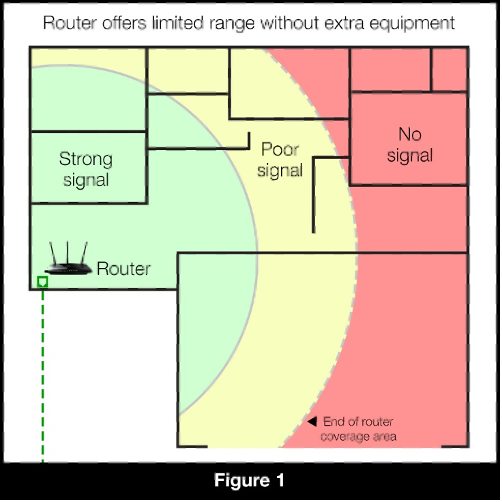
When implemented effectively, WiFi offers the flexibility to roam or to position devices in areas which are not easily cabled, while still maintaining a high access speed. Most houses however do not have an effective wireless setup. Generally speaking, these houses are serviced by a single access point or modem (see Figure 1), which has been set up wherever the cable carrying the internet happens to enter the house. The WiFi signal loses its strength the further you are situated from the modem, resulting in poor WiFi in certain areas of the home.
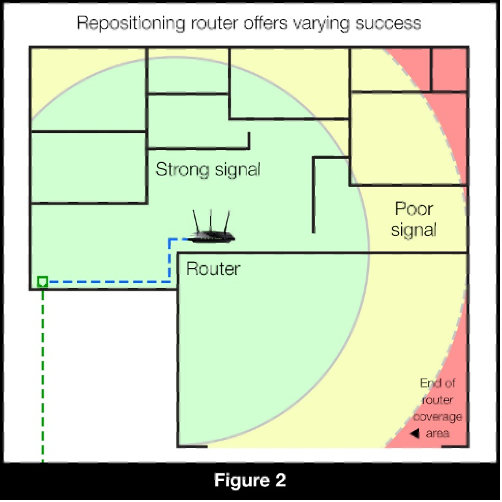
Some users may attempt to reposition the router and extend cable to that location (see Figure 2). While this may be highly effective in a small house, as you can see in the example below, the signal may not extend to all rooms in a larger family home.
WiFi extenders and mesh networks are increasingly being used by many people to extend their WiFi coverage in larger homes. They can be complex for end users to configure and require correct placement in order to make a marked difference.
In many cases, the end user will set up a single extender to connect wirelessly to the modem, then place the extender inside the room that has poor WiFi to begin with. The end result is that the extender itself will have a poor connection back to the modem (see Figure 3).
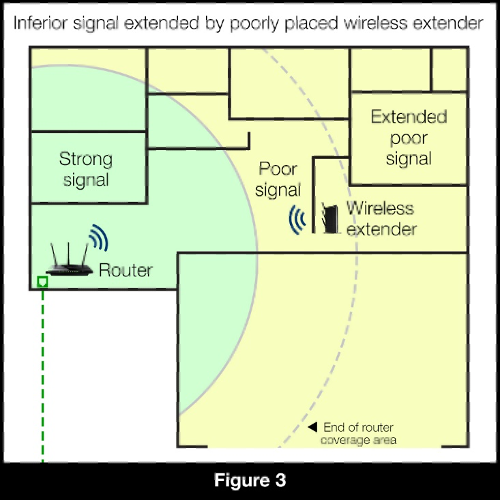
In this example, there is no increase in the speed and reliability of the WiFi in the problem area, the extender simply broadcasts the poor source signal into more rooms of the house. In addition to this, using WiFi extenders with WiFi backhaul requires the extender to use some of the WiFi capacity to communicate with the modem, in many cases halving the potential speed and causing latency.
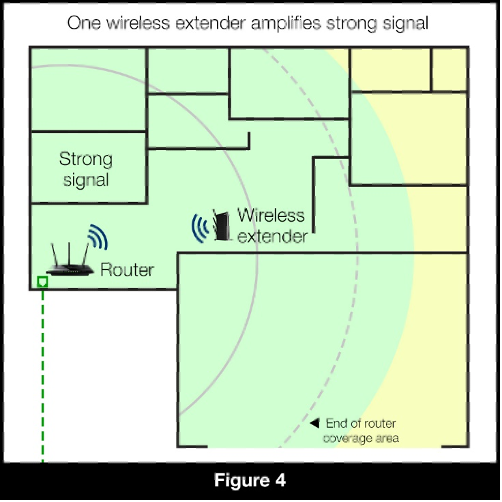
When one wireless extender is positioned correctly it can amplify a strong signal (see Figure 4). However, in some family homes this may not be adequate to provide a strong signal to the whole house and there could still be some WiFi deadspots.
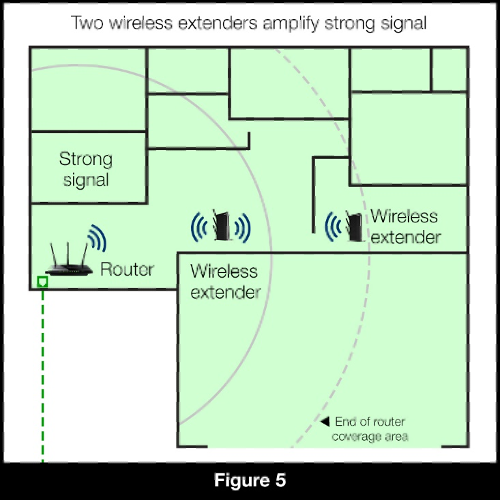
An extra wireless extender may be added, and this method can be effective if they are both placed in optimum positions (see Figure 5).In this example it has provided a strong signal to the family home and there will be reliable WiFi coverage in every room.
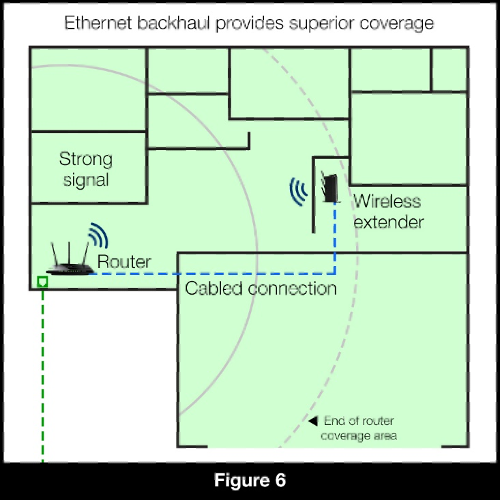
An even better approach is for the end user to engage a registered cabler (see Figure 6), to run a cabled backhaul between the modem and the wireless extender. This will provide the extender with a stronger, more stable ethernet connection, allowing it to extend a higher quality wireless connection across all areas of the house. Running cabling to the extender takes advantage of the full capacity of the internet connection at the property. The wireless extender can be positioned further away from the router (i.e: in the middle of the ‘poor signal’ zone) and in many cases will increase the WiFi coverage area using fewer extender units. Getting wiring to the optimal position after the house has been built has its challenges, but there are many ways to conceal the cabling so it’s out of sight, out of mind.
As you can see, there are ways to leverage equipment, such as wireless extenders, in conjunction with cabling to provide a stronger home network. You’ll need to consider the layout and size of the home, and the needs of the customer, as every situation is unique. For some homes a strong WiFi signal may be required for wireless speakers on a balcony or a smart TV located in an outdoor alfresco. One option is to set up a Home Distributor (HD) with wiring (Cat 5 or 6) going to different locations in the home where there are Wireless Access Points (WAP) positioned to provide coverage to outdoor areas such as a patio or backyard for entertaining. For larger houses the cabling is star wired and the broadband modem or NTD (network termination device) could be located there also (see Figure 7).
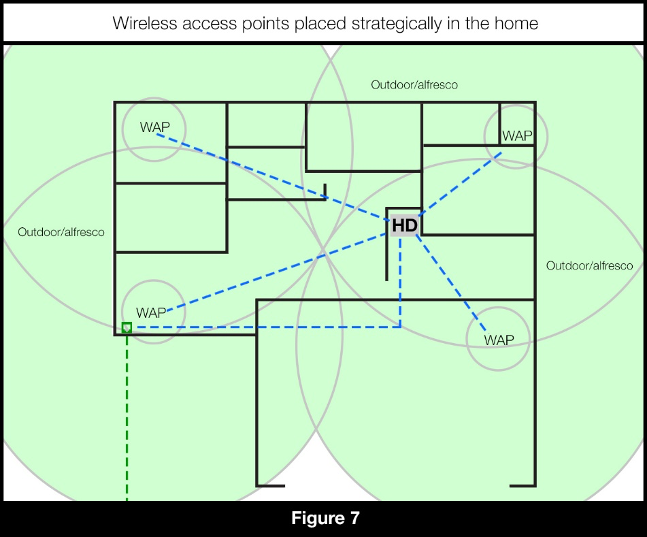
Figure 7 shows the HD in a very central location, however it could reside in a cupboard or the garage.
A setup like this will ideally consist of:
- 1x router
- 4x additional wireless extenders, mesh units or routers configured to be used as wireless access points
- 1x roll of Cat 6 cable (note: it’s worth going straight to Cat 6, as this will provide a level of futureproofing, supporting massive data transfer speeds of up to 10 Gbps, versus 100 Mbps for Cat 5), and
- 8x RJ45 outlets (also known as “8P8C” for those who read standards)
In Figure 7, the example uses four WAP points. In most cases you will find that two or three should be sufficient. Homes that are Smart Wired® offer significant advantages, in that there is flexibility to move the WAP for optimum performance.
The cheaper option for WAPs is wireless extenders but for a little more money you can deploy a mesh network, which allows all WAPs to communicate with each other intelligently. When moving around the home your devices will automatically connect to the WAP that provides the best performance.
As you can see, there are many opportunities for cablers to set up and optimise WiFi networks. Setting up wireless access point with an ethernet backhaul is well worth the effort. It will provide a robust, reliable backbone to support an effective home network for today’s “connected family”.
Have you been missing out? Don’t forget to list your business on our site!
How’s The NBN Doing?
The Australian Competition and Consumer Commission–ACCC–has just done its most recent review of overall broadband speeds across the network.
An NBN fixed-line connection utilises a physical line running to the household to connect it to the NBN network. There are a number of fixed-line technologies: fibre to the premises (FTTP), fibre to the building (FTTB), fibre to the curb (FTTC), fibre to the node (FTTN), and hybrid fibre coaxial (HFC).
Typically you get your NBN backed broadband from a Retail Service Provider, or RSP, and the latest report looks at 11 of them including companies like Telstra, Aussie Broadband, IINET & Optus.
The good news is that internet providers reached an average NBN fixed-line plan download speed of 98.3% during busy hours in December 2022 & attained download speeds close to their plan speed.
Average download speeds were steady throughout the day for users on NBN fixed-line plans . Services with a plan download speed of 100 Mbps were the most affected by increased user activity in the evening busy hours.
The average rate of outages per day on major fixed-line NBN plans was 0.35, 0.24 for services on other superfast networks and 0.37 for very high speed NBN services. These outage rates are in line with results from previous reports.
Detail:
https://www.accc.gov.au/consumers/telecommunications-and-internet/broadband-performance-data
Have you been missing out? Don’t forget to list your business on our site!
What is the NBN?
The National Broadband Network, or NBN for short, is a high speed broadband network that’s being rolled out by the Australian Government owned NBN (formerly NBN Co.)
The NBN is in charge of providing high-speed broadband connections to every home and office in Australia. It is also giving telephone and internet service providers’ access to the NBN so they can deliver services like telephony, entertainment, security and e-health to homes and businesses.
To make this happen, the NBN is using a range of broadband technologies, including:
- Fibre to the premises or FTTP
- Fibre to the building or FTTB
- Fibre to the node or FTTN
- HybridFibre Coax (HFC) or more commonly known as Pay TV cable
- Fixed wireless
- Satellite
For most people only the first three options will be important. However any NBN connection means thinking about where your internet equipment is installed in your home or office so the faster broadband speeds work properly wherever you are in the building.
No matter which type of technology is used to deliver the NBN it’s crucial the home and office wiring has been well planned. If you are cabling a new or renovated home the most important principle is that all cabling should be “star wired Cat 6 cable” from a central location where the NBN equipment will ideally be installed. This star wired cat 6 cabling you have installed can be used to connect telephone, computers, PC, laptops and even WiFi devices where you need them.
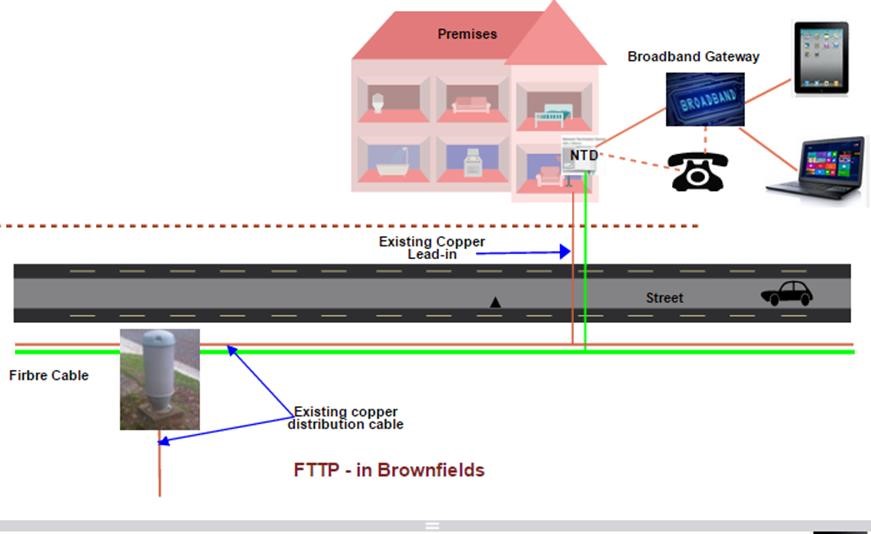
FTTP
FTTP is Fibre To The Premises, where fibre is run into your home and terminated on a device supplied by NBN called Network Termination Device (NTD for short). It allows you to have up to 2 different phone service providers and 4 different data service providers.
There are 2 sorts of FTTP rollouts. One is in new estates where fibre is the only technology installed to provide telephone and internet services to every home.
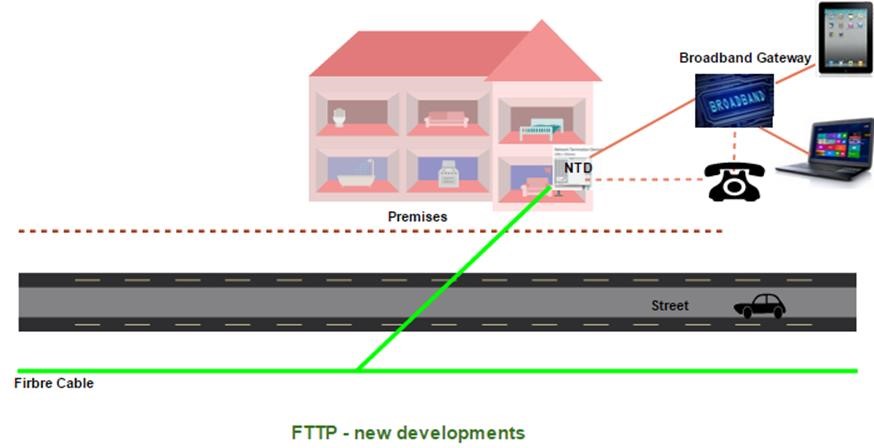
The other one is in existing suburbs. Here the fibre being installed piggybacks on the existing copper telephone network.
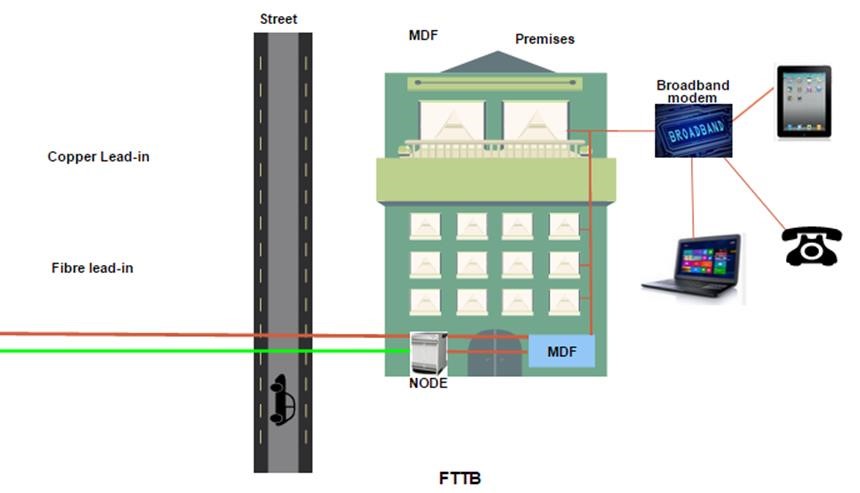
FTTB
FTTB is where fibre is installed to a building or apartment complex. It terminates at a node that converts the optical signal into one suitable for the existing copper cable in order to ’extend’ the broadband service to all apartments or offices.
The technology that helps this occur over the copper telephone wire is called VDSL, a faster version than the more common ADSL broadband. The VDSL modem will be very similar to the existing ADSL modems.
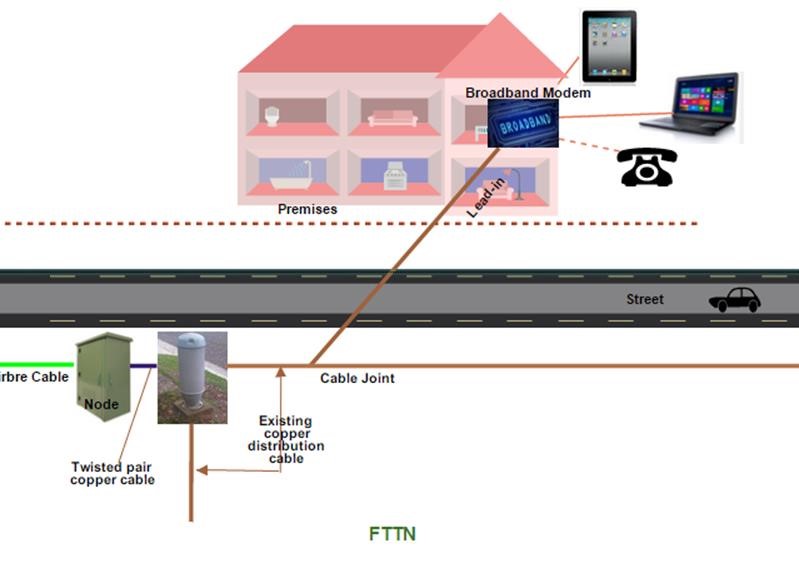
FTTN
FTTN, or Fibre To The Node, is like FTTB except the node is installed outside the premises so it can service multiple premises. The ideal location would be next to an existing telecommunications pillar.
The technology from the node to the Multiple Dwelling Unit (apartment building, townhouses, etc) or Single Dwelling Unit (freestanding house) is VDSL. The connection and installation inside the dwelling will be the same as for ADSL. The node needs to be reasonably close to the dwelling so the copper length is kept as short as possible.
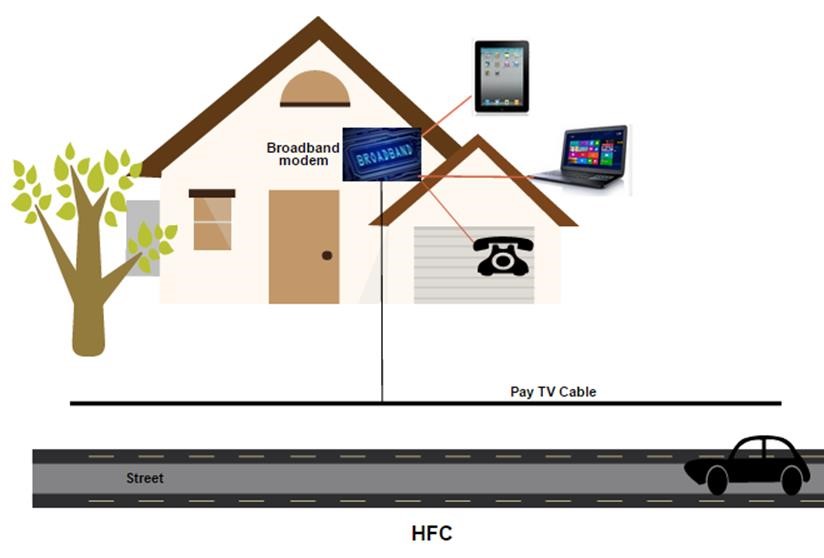
HFC
HFC is where high speed broadband is delivered over the existing pay TV network so the installation inside the home is the same as the existing cable modem. Using the latest technology it is possible to deliver both broadband and telephony from the cable modem.
Fixed wireless
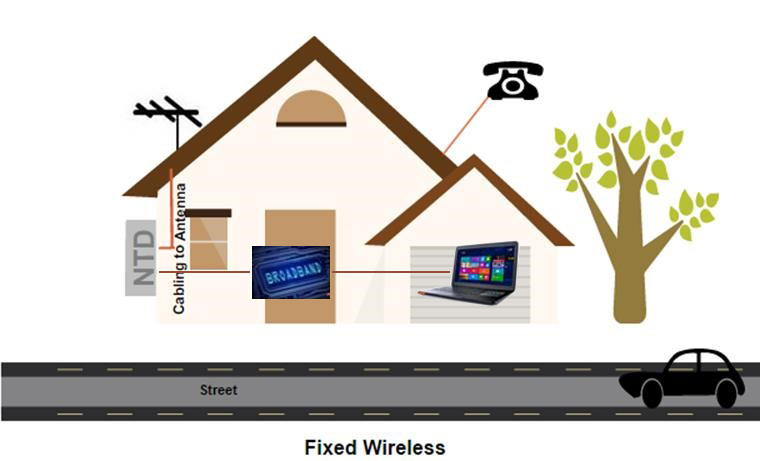
Fixed wireless is where NBN will install radio base stations like the ones used for mobile phones and then install an antenna and a fixed modem (NTD) in the premises. This NTD is only for broadband service, the telephony stays on the existing copper wires for now.
Satellite
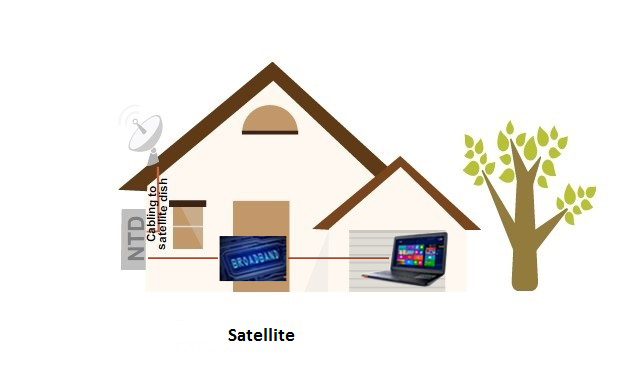
The NBN is also using satellites to cover remote areas, installing a satellite dish connected to an NTD. Like fixed wireless this NTD will provide broadband services only.
Have you been missing out? Don’t forget to list your business on our site!
Smart home safeguards against hacking
Global consumer spending on home tech is predicted to hit a record $128B this year, but all those online gadgets offers cyber criminals a possible entry to your home.
Smart home cybersecurity is now a red hot topic and with lots of companies offering all sorts of solutions. However it helps to have an overview before you jump in according to Residential Tech Today—here’s their 7 must do steps.
1. Better Password Habits
Poor password management is a common weakness. When you’re setting up these systems, make sure to change all passwords and use different ones for each device. Where possible you should turn on two-factor authentication to create another layer of cybersecurity in case a hacker gets past the password. It’s also a good idea to change all passwords every six months.
2. Automatic Updates for Cybersecurity
Cybersecurity is rapidly evolving and as tech companies discover new vulnerabilities, they release updates to fix them. Installing these patches as soon as possible ensures your devices don’t have old vulnerabilities hackers could use. It’s best to allow them to do so automatically when setting them up.
3. Secure the Router
If the router’s not secure, it can act as a gateway to all the devices it hosts, so it deserves some attention. You should change the router’s password from the default to something stronger and at same time change the router’s name since the default can tell hackers its make and model. Finally, go into the router’s settings and make sure you’re using WPA2, which encrypts data on the network.
4. Host Smart Tech on Separate Networks
Keeping everything on different networks mitigates how much a cybercriminal can access if they hack into one. Many routers have an option to create multiple networks, so you can use one for IoT devices and another for everything else. You could even utilise a unique network for each room. If your router doesn’t enable this segmentation, you can get another one to host a new system.
5. Find a Qualified Cybersecurity Service
Plenty of cybersecurity vendors today offer IoT security solutions that you can get to provide an added layer of safety. These services can range from simple anti-malware protection to 24/7 network monitoring, so there’s something for every situation.
6. Pen-Test the System
Penetration testing determines how vulnerable your system is by trying to break into it. When you hire a pen-tester, they will attempt to hack into your network through various methods and then present you with ways to improve. Getting these tests done periodically will ensure you are protected from evolving threats.
7. Factory Reset Equipment Before Upgrading
Whenever you upgrade any part of the smart home system, remember that trashed devices can still be useful to hackers. IoT items store information like Wi-Fi credentials or sensitive user data. If you throw away old gadgets without wiping them, someone could find them and access this information. If you’re upgrading a smart home, do a factory reset on any old equipment. This will make sure it will not serve as a way into the network.
Read more at: https://restechtoday.com/7-steps-for-protecting-smart-home-tech-from-hackers/
Have you been missing out? Don’t forget to list your business on our site!
Best internet speed test
Want to see what your actual internet speeds look like? An internet speed test is just what you need.
A good speed test makes it easy to see your current download speeds, upload speeds and latency (or ping) for whatever device you’re running. Here’s a guide by CNET.
Ookla
The Ookla speed test was one of the first speed tests launched and has a strong reputation for consistency. It has a heap of features, including the ability to view your speed test history (when you create an account), a wide array of servers to connect to, and even a handy app for speed testing from your Android or iOS device.
Its kept up with the times by adding new features like a video-specific speed test that measures your network’s ability to handle 4K video streams, as well as apps that you can run on Windows and on an Apple TV.
Fast
fast.com has a big advantage of being owned by Netflix. Which means the speed test is structured around checking to see if your connection is strong enough to stream Netflix in maximum resolution without buffering. It has a basic interface that is also very easy to use, but lacks some of the advanced settings you’ll find with other speed tests, for example, you can’t specify which server you’d like to connect with for your test.
M-Lab Internet Speed Test
Short for Measurement Lab, the open-source M-Lab test is the one that pops up whenever you type “internet speed test” into the Google search bar. It’s also simple to use, just click the blue “RUN SPEED TEST” button to see your download speed, upload speed and latency within a matter of seconds. However it doesn’t let you pick which server you’ll use during the test, and it’s only designed for internet speeds of up to 700 Mbps.
Speedof.me
Speedof.me is most like Ookla by showing fluctuations in your upload and download speeds over time that you can compare. It’s also mobile-friendly and is great for running tests on your phone, too, allowing you to do a quick speed test on the go without downloading an app.
Testmy.net
Testmy.net is an internet speed test that runs entirely on HTML5 and PHP, which makes it a useful tool for comparing performance between different browsers. You can also create an account to track your internet speed for future reference or comparison. It’s not the most user-friendly however, and apart from poor graphic design can throw up a lot if data to wade through.
Read more at: https://www.cnet.com/home/internet/best-speed-tests/
Have you been missing out? Don’t forget to list your business on our site!